Installation Guide / FAQ (updated: June 2023)
Installation
After installing, you will be given 7 days to evaluate our app during which time you can create one (1) sale and add up to 50 products to that sale. At anytime you can uninstall the app, however, it is strongly recommended you stop any sales before you proceed with uninstalling. Otherwise, you will be required to reset sale prices manually from within your BigCommerce admin.
How Our App Works
The beauty of our App is the ease in which you can create sales and have them start and stop based on a schedule. There is no need to worry about exporting products, updating them in a spreadsheet, then having to reimport back into your store. Also, no more fogetting to run that sale they everyone has been told about.
With our App, you simply:
- Create a Sale
- Enable the sale by clicking the checkbox
- Give it a sensible name i.e., "Bracelets 25% off". This is not shown to anyone but you.
- Select a start and end time. The default is 24 hrs starting at midnight.
- Choose how you'd like our App to calculate the sale price
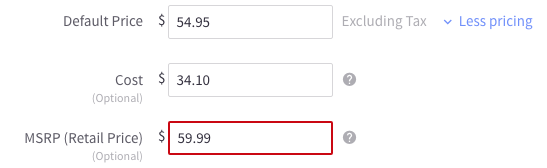
- Based on the "Default" price. For example, if the "Default" price is $54.95 and your discount is 25%, then our App will compute the sale price as $42.21. You can apply rounding to get $42.00, $42.49, etc.
- Based on the Retail price. For example, if the "Retail" price is $59.99 and your discount is 25%, then our App will compute the sale price as $44.99. You can apply rounding here too.
The caption below is a product's pricing as shown in your BigCommerce store:
- After you have the details of your sale defined, it's time to select your products you want to include in this sale
- Click the Products TAB
- Filter by Category or Brand
- You can also use the Search to find products based on price, SKU wildcard, etc.
- Add a single product at a time or a group of products
- Finally, click save and you are all done. After this you can go back to the Dashboard and you should see your newly created sale.

- NOTE: If after you save your sale you find it's been disabled automatically, please check to make sure your sale start time is not in the past.
- NOTE: If after you save your sale you find it's been disabled automatically, please check to make sure your sale start time is not in the past.
- Special Features
- If you want to start the sale immediately, simply click the "Start Sale" button. If you do this, the sale will start immediately, but it will still stop at the date and time you specified when you created the sale.
- While a sale is in progress, you can only add or remove products from the sale. To do this, simply click on the sale name.
- If you want to stop a sale that's in progress or "Running", simply click the "Stop Sale" button. The sale will stop and be automtically marked as disabled. In order for the sale to restart automatically, it must be setup as a repeat sale. To enable this feature, you must upgrade our App to the Pro or Enterprise level.
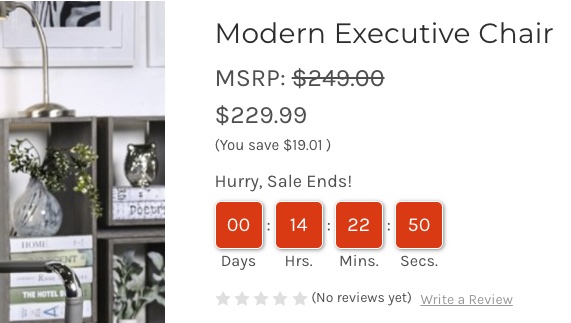
- Now supports a countdown timer for products on sale. (Enterprise level feature).
Feature of our App
Plan Comparison |
Standard | Pro | Enterprise | Unlimited | Pay Per Sale |
|---|---|---|---|---|---|
| $24.99 /mo | $59.99 /mo | $149.99 /mo | $499.99 /mo | No Subscription | |
Features |
|||||
| Total Sales (active, deactive or scheduled) You can delete old sales and reuse |
2 (one-time purchase upgradable) |
5 (one-time purchase upgradable) |
20 (one-time purchase upgradable) |
Unlimited | $25/sale (unlimited) |
| Products per sale | 150 (one-time purchase upgradable) |
500 (one-time purchase upgradable) |
2500 (one-time purchase upgradable) |
Unlimited | 10% of total products (unlimited) |
| Select sale products by Keyword, Category, Brand, or SKU |  |
|
|
|
|
| Control rounding of sale price to .00, .49, .50, .98. or .99 | |
|
|
|
|
| Override individual product Discounts or Sale Prices | |
|
|
|
|
| NEW Cross check products in other active sales to prevent duplication | |
|
|
|
|
| Add/remove products from category when sale starts/ends | |
|
|
|
|
| Support for $19.99 indication when sale is active |  |
|
|
|
|
| Auto Repeat Sale, Daily, Weekly, Monthly | |
|
|
|
|
| Capture and restore sale price for overlapping sales | |
|
|
|
|
| Protection against sale price dipping below cost | |
|
|
|
|
| Limit the number of units sold at a given price | |
|
|
|
|
| Make products visible/invisible when sale starts/ends | |
|
|
|
|
| Mark products featured/unfeatured when sale starts/ends | |
|
|
|
|
| Filter/Hide "Out of Stock" products | |
|
|
|
|
| Enterprise NEW HOT Show a countdown timer when the sale ends (create a sense of urgency) |
|
|
|
|
|
| Essential Sale Reports. See how well your sale performed - A/B testing, Gross sales, and more |
[Add On] | [Add On] | |
|
[Add On] |
| NEW Multi-Storefront Support Additional storefronts are detected and added automatically |
|
|
|
|
|
| Enterprise BETA Run sales for Price Sheets/ Customer Groups |
|
|
|
|
|
| Essential Product Variations/Options | [Add On] | [Add On] | [Add On] | |
[Add On] |
| NEW Create Sale from CSV file import | |
|
|
|
[Add On] |
- Q: I clicked the "Get this App" button in the App panel - but I get an error message. What's wrong?
- In order to install any app in your store, you must be the store owner. This is a BigCommerce security policy and cannot be circumvented.
- Q: How much does this app cost?
- Trial: FREE for 7 days. Standard: $24.99/mo, Pro: $59.99/mo., Enterprise: $149.99/mo.
- Q: Will your App break my store or change my Theme?
- Absoluetly not. Our app does not need any scripts or changes to your store's theme.
- We only "read" products from your store and "update" sale prices based on the information in your store.
- We do not have access to your customers or any logins - nor do we need access to your store's admin.
- If you upgrade to the Enterprise level of our App, we do read orders ONLY to provide a sales report so you can learn the effectiveness of your sale. This is huge for A/B testing.
- Q: Can I show a countdown timer when the sale ends?
- Yes - this is a new feature added June 2023.
- Q: My sale did not start or end at the right time. What's wrong?
- Please check your timezone in the Settings TAB.
- Q: Will your App break my store or change my Theme?
- Absoluetly not. Our app does not need any scripts or changes to your store's theme.
- We only "read" products from your store and "update" sale prices based on the information in your store.
- We do not have access to your customers or any logins - nor do we need access to your store's admin.
- If you upgrade to the Enterprise level of our App, we do read orders ONLY to provide a sales report so you can learn the effectiveness of your sale. This is huge for A/B testing.
- Q: What kind of support can I expect if I run into an issue?
- Great question - and one that's easy to answer. We are US based and have an all American team that support our Apps. We provide email support for Trial, Standard and Pro accounts which in most cases are answered in less than 24hrs. For our Enterprise accounts, we provide email and phone support, M-F, 9-4pm Central Time with turnarounds less than 1 hour.
- You can find out more about our company by visiting our website.
- Q: Can I uninstall the App at anytime and will billing stop?
- Yes. You can uninstall our app at anytime and ALL billing will stop. However, your "data" will be preserved until 10 days after you uninstall. We do this just in case you uninstall our app by mistake - allowing you to reinstall and still have access to sale profiles you've created.
- It is strongly recommended you stop all sales before you uninstall our App. Otherwise, you will be required to "reset" sale prices for any products in your sales profiles - manually.
- Q: Does your app support repeat sales?
- Yes - we have a comprehensive scheduling system that will allow repeat sales:
- Daily
- Weekly
- Monthly
- Yes - we have a comprehensive scheduling system that will allow repeat sales:
- Q: Can I set percentage discounts and fixed sale prices for products?
- It Depends. Standard, Pro and Enterprise plans can be upgraded to support CSV import - where you can set fixed discount prices in the CSV file.
- Enterpise plans allow for overriding individual product prices - i.e., ignoring the default percentage discount and setting them to a fixed price.
- Q: I placed my products on sale but they do not show as "On Sale" in my store - what's wrong?
- We don't see this often - but in some rare cases, your store's theme is not configured to show the "On Sale" indicator. Contact your store tech support.
- In some cases, the sale price is greater than the default price - please check products in your store for this issue.
- The discount price (because of rounding preference) is causing no change in the sale price. I.e., the product price is < $10 and the discount >= 10%.
- Q: Is there a CSV import that will allow me to set fixed sale prices for products?
- Yes. This is a (one time) add on feature for standard, pro and enterprise. Pay per sale includes this feature.
- Q: Can I stop a sale if I run out of inventory or I sell "X" number of products?
- Yes - a feature you will not find anywhere else! Our app allows you to remove any product from a sale that reaches a "target" inventory or where no inventory is left. To do this, your product in BigCommerce must be set to "Track Inventory" and must have at least one unit in stock. Additionally, you must upgrade your app to "Enterprise" level to gain access to this feature.
- Q: When your App stops a sale either on demand or based on a schedule, does it reset my sale prices?
- Yes - all sale prices are reset to previous values before our App started the sale.
- With our App, you can even run a temporary (deeper) sale on products already on sale, and our App will reset the sale price back to the exact amount after the sale is stopped or when it ends normally.
- Q: What if I still uninstall this App while a sale is running?
- You will need to edit products in your BigCommerce store manually to reset the sale prices for each.
Terms and Conditions
Copyright © 2017-2026, SOURCE Web Solutions, Inc. all rights reserved